Case Study · Real-Time Inquiry Portal
From Email Threads to Real-Time Visibility
The Problem
After submitting a loan inquiry, clients had no idea what happened next. Updates lived in scattered email threads, files got lost between replies, and account managers spent hours each week just trying to figure out where things stood.
The Solution
A single workspace where clients could track every inquiry in real time — see exactly who's handling it, message teams inline, and share documents without ever opening their inbox.
62%
Faster avg. case resolution
docs, messages, and status all in one place
6 hrs
Saved weekly per manager
no more manual spreadsheet updates
0
Status meetings needed
replaced by live dashboards
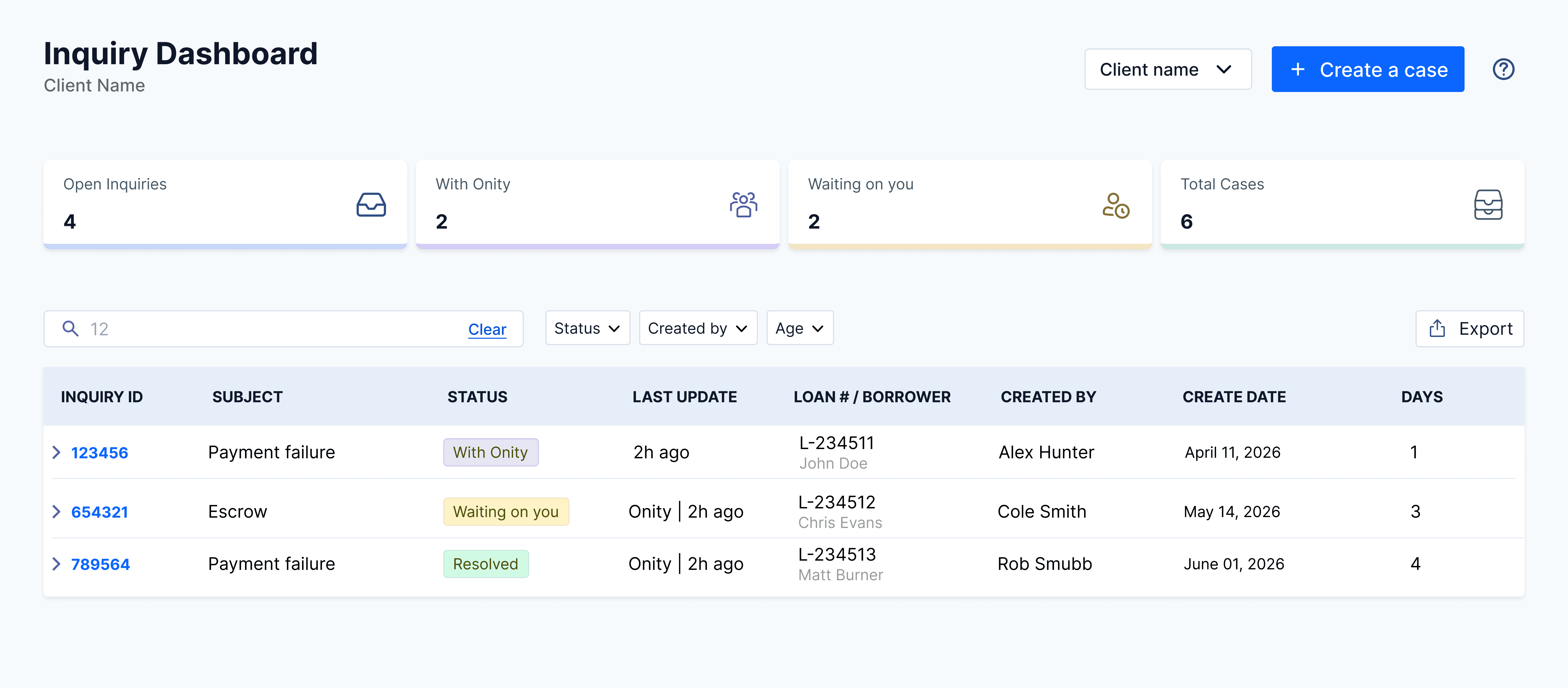
A central hub — every loan inquiry in one organized, live view
WHAT
A complete case management workspace where clients can track progress, view documents, and message teams directly in one place.
WHY
After creating a case, clients had no way to see details, find files, or get updates without digging through fragmented email threads.
WHO
Mortgage companies and Client Account Managers who need to oversee every case submitted by their organization and run high-level reports.
WHERE
A secure digital dashboard that serves as the main command center for daily case management and company-wide reporting.
Details, such as names, workflows, and interfaces, have been modified to maintain confidentiality.
Problem area
Lost in the back-and-forth
Mortgage companies and subserviced clients currently lack a way to manage their loan inquiries after the initial request is sent. Because there is no central place to track progress, exchange documents, or message teams, clients are forced to dig through hundreds of emails to find specific case details or files. This lack of visibility leaves client account managers "in the dark," making it impossible for them to oversee their company’s full workload or generate accurate reports.
Zero visibility after creation
Once a case is opened, clients have no way to see its status or who is working on it. Without a real-time tracker, they are forced to send repetitive "just checking in" emails simply to find out if their request has moved forward.
Fragmented messaging and files
Critical messages and loan documents are currently scattered across individual email threads. This makes it difficult to find the latest version of a file or follow a conversation history, often leading to confusion and missed updates.
Meeting-heavy status management
Because the email process is hard to track, teams rely on manually updating Excel spreadsheets and holding bi-weekly status meetings just to stay in sync. This wastes hours every week on reporting data that is often already out of date by the time the meeting happens.
"Give me the visibility to see where we sit. Show me if I’m 20% or 80% done — simple milestones or a small chart."
— Ivan Camarena, Client User
"I need to see all of our open cases, not just mine — so I can cover when someone’s out."
— Glenda Brue, Client Administrator
Through user interviews, a clear pattern emerged: clients felt invisible after submitting a request, struggled to track shared progress, and found it impossible to manage their team’s full workload. This led to a cycle of endless follow-up emails, heavy reliance on manual status meetings, and a total loss of trust in the process.
DESIGN GOALS
What I aimed to achieve
Total transparency
Give mortgage companies a clear view of their case status, key dates, and loan info so they never have to guess what is happening after they hit submit.
Centralized communication
Move messages and files out of messy email threads and into the case itself, making it simple for teams to stay in sync and find what they need.
Company-wide oversight
Allow account managers to oversee every case across their entire company and run reports, making sure they can stay in control of their full portfolio.
Solution
A central hub for real-time oversight
One place where every loan inquiry lives ( status, owner, key dates ) updated in real time. The "where is my case?" emails stop, and clients can finally trust the system as the source of truth.
Dashboard view
One screen, every case at a glance
1
Visual Hierarchy · Fast Feedback
Status summary cards
Why: Users felt ignored after sending emails because they couldn’t see any progress. I added these cards so they can see the state of every case the second they log in.
It gives users peace of mind that their work is being tracked and stops them from sending constant “is this done yet?” emails.

2
Data Transparency · Recognition
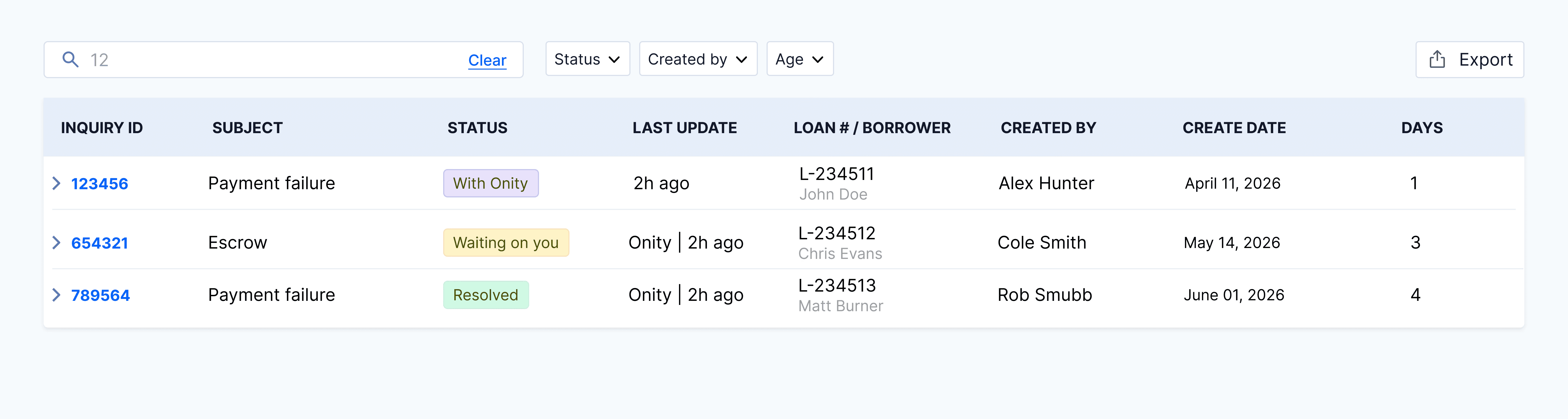
The live case table
Why: Teams were wasting 12 hours a week manually updating spreadsheets. I built this table to be the single “source of truth” for every inquiry.
It kills the need for boring status meetings. Anyone can find an answer in seconds using filters instead of digging through old emails.
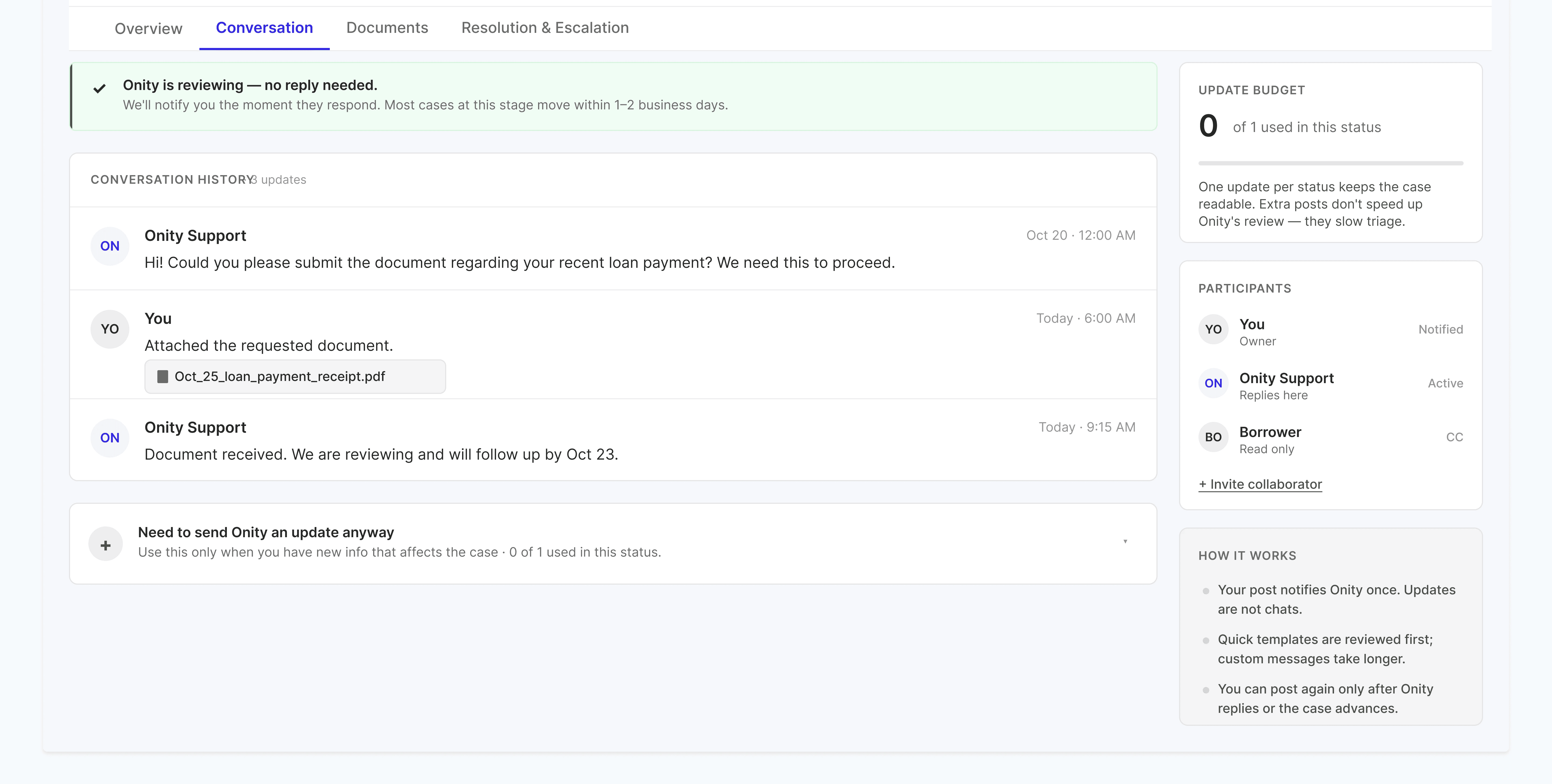
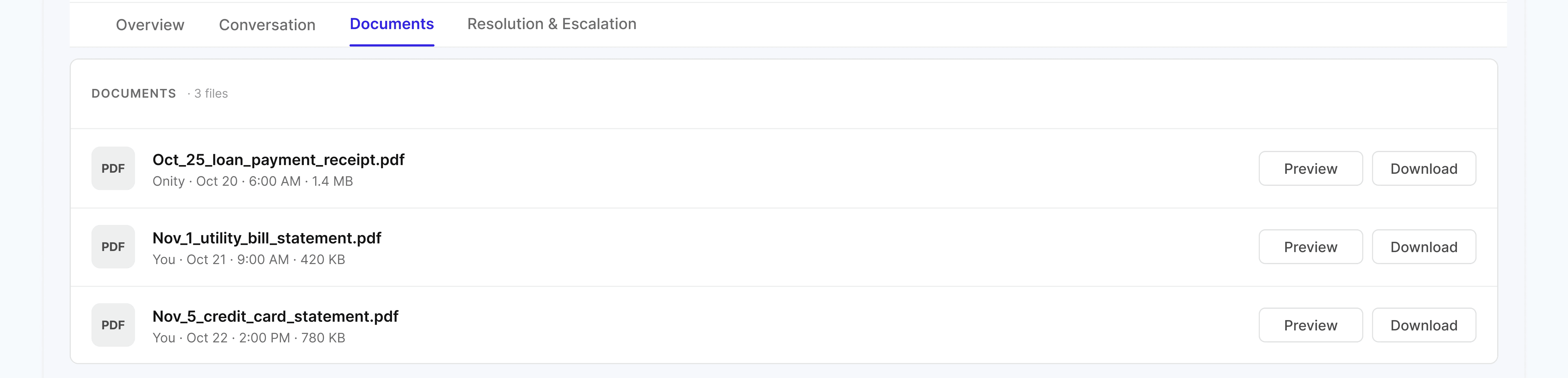
Case detail view
Detailed insights and interaction
A full-page case view that puts progress, conversation, and documents in one shared history — so clients and account managers stop hunting through email threads for the latest state.
1
System Status · Visual Cues
Real-time progress tracker
Why: Research showed that users need to know if a case is just starting or almost finished. I put this tracker at the top so clients can see exactly where they are in the process at a glance.
This stops clients from having to email just to ask for a status update. They can see immediately if the team is working on it or if it’s their turn to act.

2
Information Access · Context
Unified messaging and files
Why: Loan documents and messages were often lost in long, cluttered email chains. I combined the chat and the document list into one view so all the context stays with the case.
This makes it much faster to find a file or read the latest message. It also helps teammates step in and help if someone else is out of the office.
3
User Control · Feedback Loops
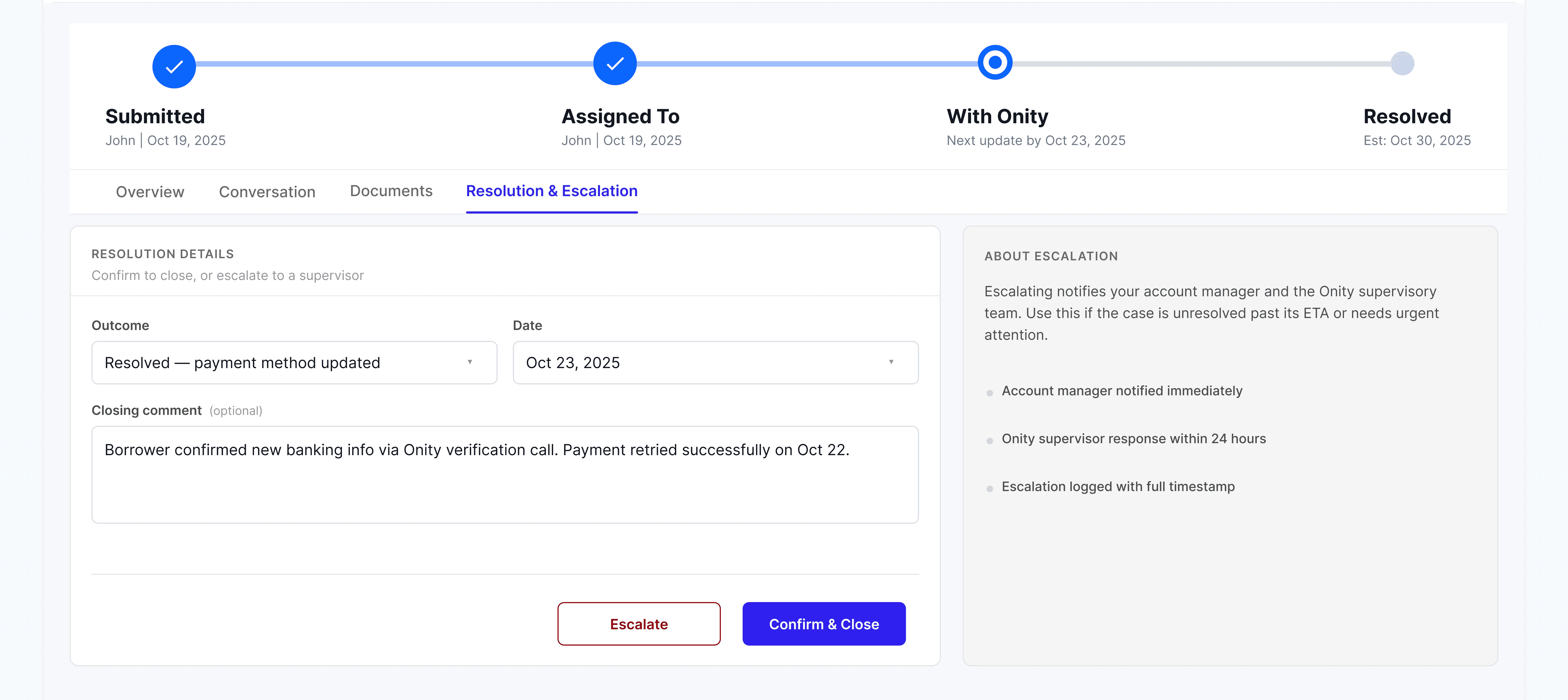
Case resolution and feedback
Why: Clients didn’t have a clear way to confirm a problem was fixed or to ask for extra help. I added a section to let users officially close a case or send it to a manager if it needs more attention.
This gives the client control over finishing their work. The rating system also lets the team know if the client is happy with the service they received.
Validation
Did it work?
The project is currently in development, with the team using a sprint-based approach to build the MVP first. We are focusing on getting the most important tracking features ready before adding more complex tools in future updates. To make sure we were on the right path, I ran usability tests with a clickable prototype. The feedback from mortgage clients and account managers showed that these changes will have a big impact on their daily work.
90%
Success in status tracking
During testing, almost every user was able to find the exact stage of their case on the first try without any guidance.
Zero
"Lost" conversations
Users reported that having the chat and files tied directly to the case made them feel more confident about the history of the request.
12 hrs
Saved per analyst per week
Our tests confirmed that the portal’s live data is accurate enough to replace these manual reports entirely.
Post-launch
What I’ll monitor after launch
Once the MVP is live, I’ll track these three areas to ensure the product is succeeding.
📉
Shift in communication
I’ll monitor if “status update” emails decrease as portal logins increase to confirm users are trusting the dashboard for answers.
📤
Document task completion
I’ll track how quickly clients upload requested files through the portal compared to the old email-in method.
📊
Self-serve reporting success
Case study · Dinesh Kumar · Real-Time Inquiry Portal · 2026